
To use Zotero for IEEE citations, select the document’s style, check the records behind your citations, and refresh the bibliography after corrections. In Word, the style control is Document Preferences on the Zotero tab. In Google Docs, it is Preferences in the Zotero menu. A numbered entry can still contain a wrong year or page range when its source record is wrong. The three records below show how those mistakes reach the output and which fields to repair before your final check.
Set the Document Citation Style
In Zotero Settings, open Cite and use Get additional styles if the required style is missing. Search the Zotero Style Repository and check the full name. On Oct. 4, 2026, the general style was listed as IEEE Reference Guide version 11.29.2023, with the style ID http://www.zotero.org/styles/ieee. Search results also include styles for particular IEEE publications.
The IEEE reference guide available through IEEE's official link was V3.28.2025 when checked. Compare the output with that guide and your receiving journal’s instructions. Follow the venue's requested style and inspect the rendered entries.
In a linked Word document, open Document Preferences from the Zotero tab and select the required style. Insert sources with Add/Edit Citation, then insert the list with Add/Edit Bibliography. In Google Docs, use Preferences in the Zotero menu; that workflow requires Zotero desktop and the Zotero Connector. See Zotero's Word instructions and Google Docs instructions for the controls.
Selecting a style for a standalone bibliography does not select the style inside every document. If an existing paper still uses author-date citations, check its own preferences. Our Word guide and Google Docs guide cover paragraph layout and static lists separately.
Inspect Source Types and Metadata
Start with the publication's landing page, DOI, or your copy's ISBN. Zotero's item-adding documentation explains why a publisher page usually supplies a better record than a generic webpage. A downloaded PDF also needs a parent bibliographic item before you can cite the work it contains.
For the small test here, we imported one journal article, one conference paper, and one book into ZoteroBib. Its FAQ confirms that it uses Zotero's citation engine and styles. We deliberately changed one field per item, observed the wrong output, and restored the verified value. These are teaching errors, not defects discovered in the original imports. This tests metadata and style output; it does not test the desktop plugin's Refresh command.
Journal article
The IEEE record and publisher-deposited Crossref metadata identify “Gradient-based learning applied to document recognition,” four authors, volume 86, issue 11, November 1998, and pages 2278-2324. The imported item was a Journal Article. Its full Publication field was Proceedings of the IEEE, with Proc. IEEE in Journal Abbr.
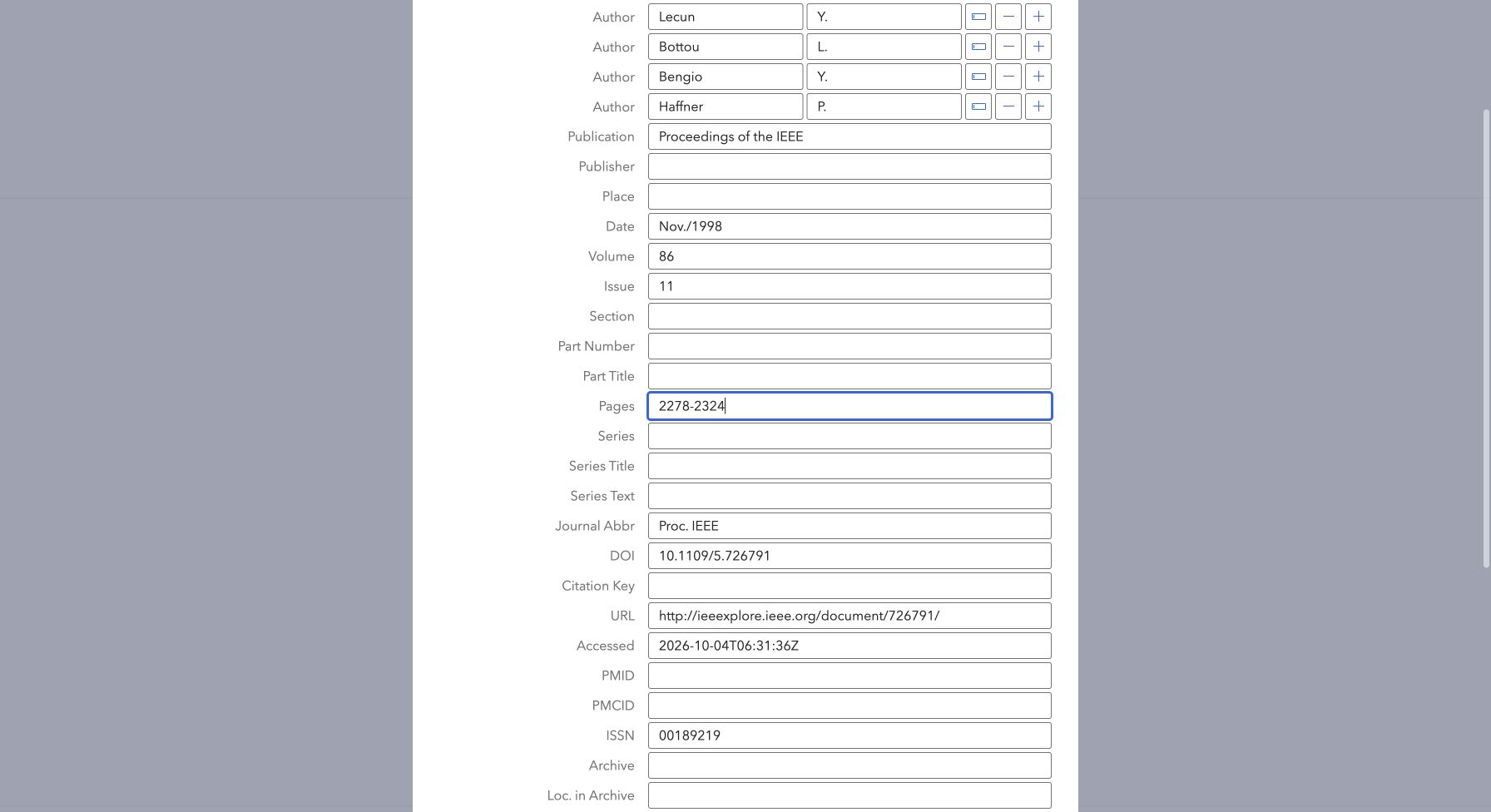
Keep author order and separate given names from family names. Check the article title, publication, date, volume, issue, pages, and DOI against the source. An IEEE style will format the page range you entered. If the end page is wrong, correct it in the record.
Actual corrected output was
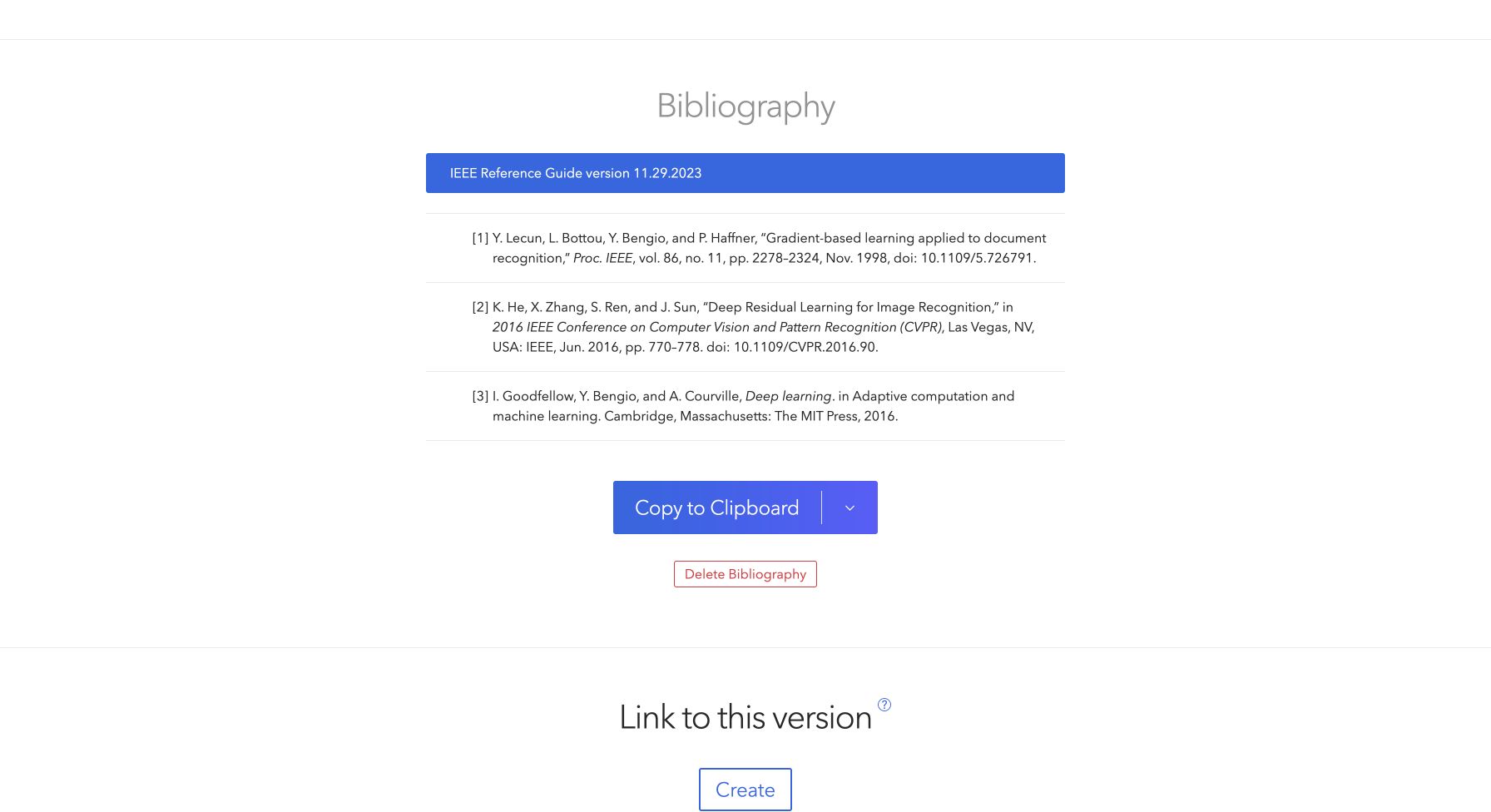
[1] Y. Lecun, L. Bottou, Y. Bengio, and P. Haffner, “Gradient-based learning applied to document recognition,” Proc. IEEE, vol. 86, no. 11, pp. 2278–2324, Nov. 1998, doi: 10.1109/5.726791.
Conference paper
He, Zhang, Ren, and Sun's CVPR paper, “Deep Residual Learning for Image Recognition,” has pages 770-778 and DOI 10.1109/CVPR.2016.90. The import produced a Conference Paper item. Its Proceedings Title identifies the published container, while the paper title identifies this contribution.
The corrected output retained the imported proceedings name
[2] K. He, X. Zhang, S. Ren, and J. Sun, “Deep Residual Learning for Image Recognition,” in 2016 IEEE Conference on Computer Vision and Pattern Recognition (CVPR), Las Vegas, NV, USA: IEEE, Jun. 2016, pp. 770–778. doi: 10.1109/CVPR.2016.90.
The style did not shorten that full title automatically. Check your venue's proceedings abbreviation and location requirements before submission. If your conference paper was saved as a Web Page, change its item type and check the proceedings fields before formatting it.
Book
The MIT Press record for Deep Learning lists Ian Goodfellow, Yoshua Bengio, and Aaron Courville, published in 2016. The hardcover ISBN is 9780262035613. Our Book import included The MIT Press, Cambridge, Massachusetts, and the series Adaptive computation and machine learning.
The corrected output was
[3] I. Goodfellow, Y. Bengio, and A. Courville, Deep learning. in Adaptive computation and machine learning. Cambridge, Massachusetts: The MIT Press, 2016.
That is captured style output, including its casing and series wording. Check title presentation and publication-place conventions against the applicable guide. Use the edition and year of the copy you consulted; do not add an edition number that its record does not establish.
| Record | Deliberate wrong input | Restored field | Observed output change |
|---|---|---|---|
| Journal | Pages 2278-2325 | Pages 2278-2324 | End page changed from 2325 to 2324. |
| Conference | Pages 770-779 | Pages 770-778 | End page changed from 779 to 778. |
| Book | Date 2017 | Date 2016 | Publication year changed from 2017 to 2016. |
Check the journal abbreviation setting
For Zotero IEEE journal abbreviation problems, inspect both the item's Journal Abbr field and the document's preferences. Zotero's abbreviation help explains that automatic MEDLINE abbreviations can override that field. Disable Use MEDLINE journal abbreviations when you need the stored value, enter the verified abbreviation, and refresh. Consult our IEEE journal abbreviations guide for checking the required form.
Refresh the Bibliography After Corrections
In a linked manuscript, correct the library item that the citation actually uses. Open the citation with Add/Edit Citation, click its item bubble, and choose Open in My Library when available. Searching by title alone can lead you to edit a duplicate record that the document never cited.
With the cited item selected, open Info in the right-hand pane and click the field you need to change. Zotero saves those edits automatically. For our journal record, set Pages to 2278-2324. Return to the document and use Refresh, then inspect the affected reference and its in-text citations. Verify that 2324 appears in the output and that its bracket number still identifies that article. After inserting or moving citations, check their sequence throughout the paper.
Refresh can overwrite edits made directly to a managed bibliography. If an output detail remains wrong, inspect the linked item, chosen style, and document settings. A source from a collaborator's private library may require that person to make the correction. Keep an editable original before using Unlink Citations on a final submission copy; unlinking removes the connection needed for later updates.
Know When a Standalone List Is Enough
A short assignment with settled sources may only need a static Zotero IEEE bibliography. Select the library items, right-click, choose Create Bibliography from Items, select the required IEEE style, and choose Bibliography as the output mode. Zotero's bibliography instructions cover copying and file output.
Pasted text has no live connection to manuscript citations. Arrange the sources in the required order and recheck every number after inserting an earlier source. For a separate comparison, use the IEEE Citation Generator to inspect a supported source record. It does not connect its output to Zotero fields. Keep a Zotero-managed document in that workflow. If your starting records are in a .bib file, the BibTeX to IEEE guide explains the site's separate import route.
Frequently Asked Questions
Why does my Zotero IEEE citation still have the wrong date?
Check the linked item's Date field and refresh the document. Changing the style does not verify a year, and correcting a duplicate library item will not update the cited record.
Why is Zotero showing the full journal name?
Confirm the selected style, the verified Journal Abbr value, and the automatic-abbreviation option. Inspect the refreshed entry against the venue's requirements.
Will changing IEEE styles fix all source types?
It can change formatting. A conference paper stored as a webpage or a book with the wrong edition still needs a metadata correction.
ZoteroBib web tested in Chrome on Oct. 4, 2026, using IEEE Reference Guide version 11.29.2023. The three-record check measures no general accuracy rate. Zotero desktop and document integration were not exercised; their steps follow official documentation checked that day.