
To add an IEEE citation in Google Docs, prepare a checked numbered reference list and match every bracket number to the manuscript. The built-in Citations panel offers MLA, APA, and Chicago Author-Date. For a static IEEE list, put each source in its own paragraph, add a tab after the number, and apply a hanging indent. Pasted references need manual renumbering when you insert an earlier source. We tested that change in a new document on Oct. 3, 2026, and captured the result below.
Check the Available Citation Styles
Open Tools, then Citations, and inspect the style menu. Google's citation help lists MLA, APA, and Chicago Author-Date. The same three options appeared in our new document on Oct. 3, 2026. To use IEEE, prepare the references outside that sidebar or use a citation manager with an IEEE style.
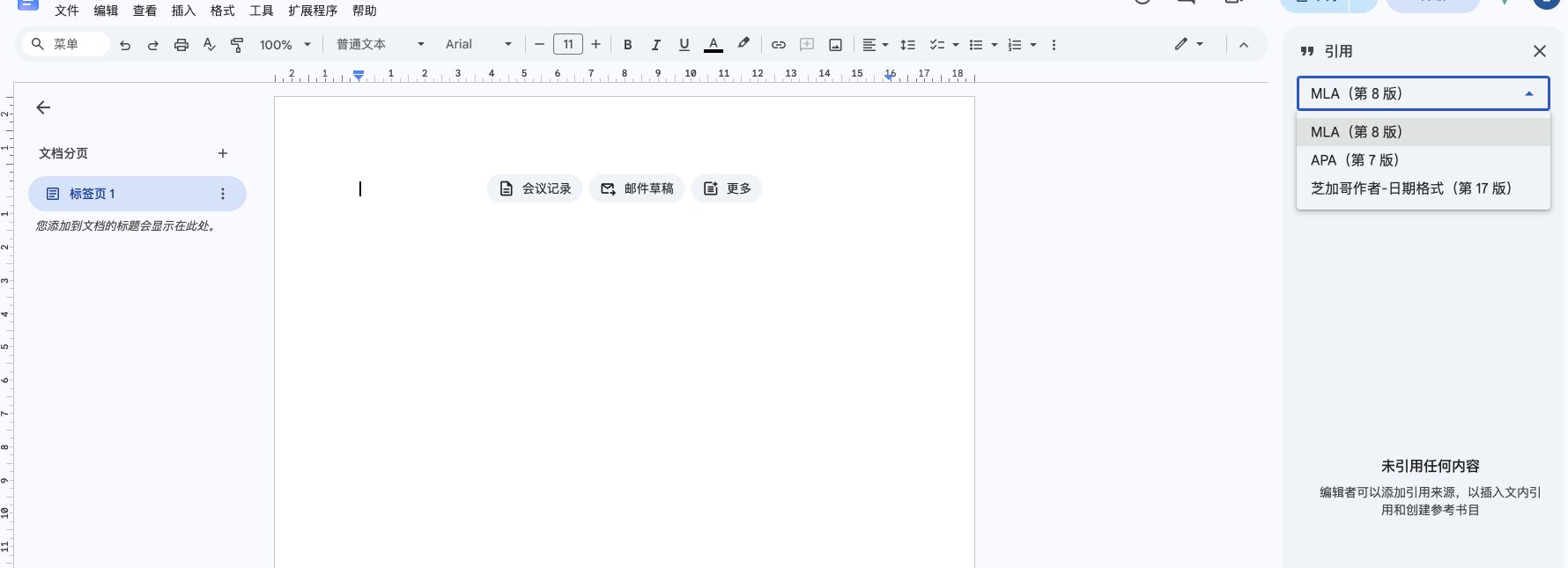
A checked static list works well for a short manuscript whose sources are mostly settled. If you are still adding and moving citations throughout the draft, a citation manager can keep them connected to the reference list. Check the source records and the receiving venue's instructions whichever route you choose.
This guide tests the static route in desktop Chrome. The screenshots come from a fresh Google Doc, including a long conference entry and an insertion that changes later numbers. Zotero's linked workflow is described separately from its official documentation.
Add a Checked Static Reference List
Prepare the references before adjusting their appearance. Compare each entry's author order, title, publication, year, pages or article number, and DOI with its source. Arrange the list in the sequence required by your course or venue, commonly the order of first citation. Cite the same source again with its existing number.
- Build the listReview records in the IEEE Citation Generator reference list. Move entries into the manuscript's required order, then use Copy all. A source you cannot verify needs attention before you paste it.
- Paste below ReferencesIn Docs, create a References heading and place each complete entry in its own paragraph. Press Enter between sources and allow long entries to wrap naturally.
- Add a tab after each numberReplace the gap between [n] and the author with one Tab character. Keep the bracket number as ordinary text for this workflow. Extra spaces can move [10]'s author farther right than [9]'s.
- Restore character formattingCopy all provides plain text. Apply italics to journal, book, or proceedings titles as required by the relevant source format. Keep article titles in quotation marks.
Our first entry uses Norman Paskin's IEEE Xplore record for “Toward unique identifiers”. It identifies Proceedings of the IEEE, volume 87, issue 7, July 1999, pages 1208–1227, and DOI 10.1109/5.771073. A complete formatted entry is
[1] N. Paskin, "Toward unique identifiers," Proc. IEEE, vol. 87, no. 7, pp. 1208–1227, Jul. 1999, doi: 10.1109/5.771073.
In that entry, select Proc. IEEE and apply italics. For DOI lookup and field checks, use the DOI to IEEE citation guide. If you need a formatted DOCX, the Word reference-list guide explains the generator's export and its fixed numbers.
Fix Paragraph Formatting and Numbering
The IEEE Reference Style Guide, section II, places bracketed numbers in a separate column to the left of the reference text. A hanging indent keeps wrapped lines at the text column. The tab after the number brings the first author to that same position.
Select the reference paragraphs without their heading. Open Format, Align & indent, and Indentation options. Choose Hanging under Special indent, enter the distance you need, and apply it. Google's hanging-indent instructions describe this menu path.
| Control | Test value | Visible result |
|---|---|---|
| Left / Right | 0 cm / 0 cm | Bracket numbers start at the document text margin. |
| Special indent | Hanging, 1.27 cm | Wrapped text starts 1.27 cm to the right of the numbers. |
| After [n] | One tab | The author starts at the same column as wrapped lines. |
| Font | Arial, 11 pt | A readable layout test, before applying a submission template. |
These are sample settings. The tested dialog uses centimeters, so 1.27 cm equals 0.5 in. Follow your submission template's dimensions, font, and spacing. If the first author and wrapped lines differ, inspect the ruler and make the tab stop meet the text indent. Increasing indentation across the entire paragraph can leave the number column away from the margin.
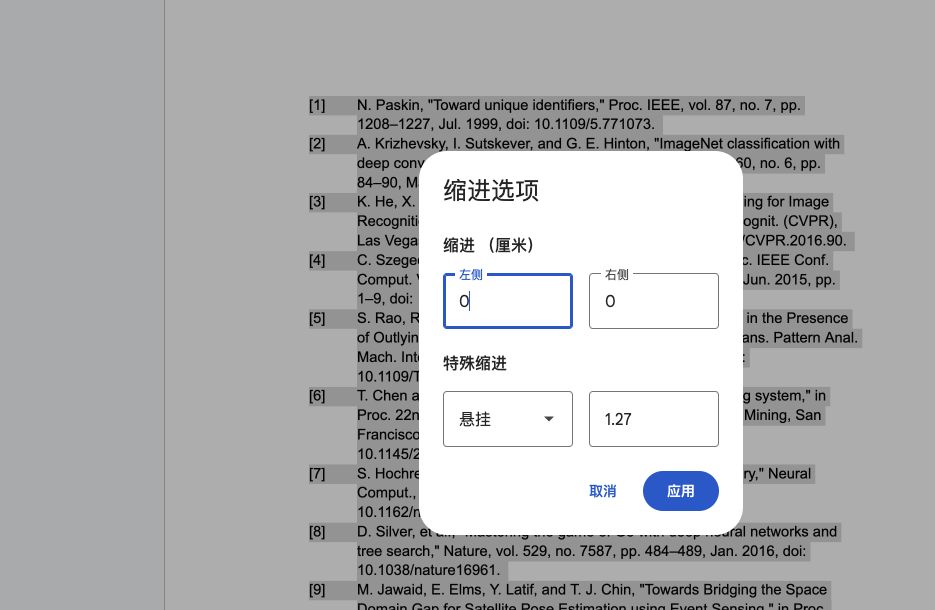
Use one paragraph per reference. A manual line break within an entry can make later edits harder to inspect. Leave long titles and DOIs intact and let Docs wrap them. Adding spaces or a visible hyphen inside a DOI changes the identifier a reader will copy. Inspect the exported PDF after applying the final page layout.
Insert a source and check both sets of numbers
We began with nine entries and added LeCun, Bengio, and Hinton's “Deep learning” as a new [2]. The original second entry also remained [2]. Ordinary bracket numbers typed in a document have no connection to source records.
![Actual Google Docs list immediately after inserting Deep learning as reference two, showing two entries labelled [2] and unchanged teaching markers below the list.](/blog/ieee-citations-google-docs/inserted-source.jpg)
| Source | Before | After |
|---|---|---|
| Paskin | [1] | [1] |
| LeCun and colleagues | New source | [2] |
| Krizhevsky and colleagues | [2] | [3] |
| Silver and colleagues | [8] | [9] |
| Jawaid and colleagues | [9] | [10] |
We rebuilt the affected list numbers and manually changed the teaching markers below it. Audit every affected citation in your manuscript, including repeated mentions and captions. A blind sequence of replace-all operations can change a newly assigned number again. Keep a source-to-number mapping and check each match in context. The in-text citation guide covers this document-wide check.
![Google Docs layout sample after manual renumbering, with aligned reference numbers [9] and [10], a wrapped long conference DOI, and corrected teaching markers.](/blog/ieee-citations-google-docs/aligned-reference-list.jpg)
Choose Zotero for a Dynamic Workflow
Zotero's Google Docs documentation describes linked citations through the Zotero desktop app and Zotero Connector. In the Zotero menu, use Preferences to select IEEE, Add/Edit Citation for manuscript citations, and Add/Edit Bibliography for the reference list.
Correct author names, source types, or publication details in the Zotero library, then use Refresh. Check the result against the original source and your venue's guide. Avoid hand-editing a managed bibliography because refreshing can overwrite those changes. Keep collaborators in the same linked workflow.
The static list tested here contains no Zotero links. Installing a citation manager does not automatically connect its paragraphs to the citations already typed in your paper. Add the source records and insert linked citations through the manager. Keep an editable original if you later create a submission copy with unlinked citations.
Frequently Asked Questions
Does Google Docs have an IEEE bibliography option?
The built-in Citations sidebar tested here offers MLA, APA, and Chicago Author-Date. Use a checked static IEEE reference list or a citation manager with an IEEE style.
Will automatic list numbering update citations in my paragraphs?
A native numbered list manages its list labels. Ordinary bracket numbers in the manuscript still need manual changes. Linked citation-manager references can be updated within that manager's workflow.
Is a 0.5-inch hanging indent mandatory for IEEE?
The 1.27 cm indent is our test setting. Use your publication or course template's distance and check that the numbers, first authors, and wrapped lines form consistent columns.
Google Docs web tested on Oct. 3, 2026, in Chrome 154.0.8037.93 on macOS 26.7.1. Docs exposes no fixed application build number. IEEE sections I and II, Google help, and Zotero documentation were checked that day; Zotero was not installed or tested for this article.