
To create a Mendeley IEEE citation in Word, open Mendeley Cite, choose Citation Settings, then Change citation style. Select the required IEEE style and apply it with Update citation style. Check the source records in your library before inserting the bibliography, then use More and Refresh References after corrections. This guide follows the current Mendeley Cite instructions and compares three real publications with their source records. One live catalogue entry shows why a reference can look complete while its last page still needs checking.
Identify Your Mendeley Product and Version
Mendeley Cite is the Word add-in that inserts linked citations and builds a bibliography. Mendeley Reference Manager stores and edits your source records. The older Mendeley Desktop citation plugin has a different toolbar, called Cite-O-Matic. Check the name before following a menu path.
You need a Mendeley account and a Word environment that supports the add-in. Microsoft lists Word on the web, Word 2016 or later on Windows and Mac, and Word on iPad. An institution can restrict add-in installation. Open Mendeley Cite in Word and sign in to the account holding your references. Reference Manager can remain closed because Cite reads the cloud library.
These steps follow Mendeley's help guides, checked on Oct. 5, 2026, alongside its v1.69.4 release notes from Sept. 14. The screenshots show the public catalogue and IEEE Xplore. We checked those records in Chrome; Word add-in operations follow the official instructions and were not tested in a signed-in document.
Select and Apply the Mendeley Cite IEEE Style
Set the style inside the document's Mendeley Cite panel. Word's separate bibliography Style menu and the citation box on a Mendeley catalogue webpage control different outputs.
- Open Citation Settings in Mendeley Cite.
- Select Change citation style.
- Choose the required IEEE style. If it is absent, use Search for another style and search for IEEE.
- Read the full style name. A journal-specific style may differ from the general IEEE style.
- Select Update citation style. Check the preview and the document's citations.
Mendeley's style-selection guide documents these controls and explains that changing the style reformats an existing bibliography. Follow your course or journal's requested style. For a supplied CSL URL, the same guide describes Add custom style.
To insert a citation, place the cursor in the manuscript, select the source's checkbox under References in the Cite panel, and choose Insert citation. Those controls appear in Mendeley's insertion guide. A previously typed [1] stays ordinary text; use the add-in for references you want it to manage.
Correct the Records Behind the Bibliography
Open the cited source in Mendeley Reference Manager and inspect its Info panel. Compare the DOI or ISBN before editing. A similar title can belong to a duplicate, a preprint, or a different book edition. Correcting another record leaves the citation's source unchanged.
Mendeley's library guide identifies the Info panel. Its reference-adding guide covers PDF extraction and manual entry. For an incomplete import, use Add new and Add entry manually, select the appropriate type, and fill verified fields.
We independently checked these three publications against their publisher or repository records. The journal entry has an observable error in Mendeley's public catalogue. The conference and book rows give you fields to compare with your own library.
| Source | Verified identity | Fields to inspect |
|---|---|---|
| Journal article | LeCun, Bottou, Bengio, Haffner10.1109/5.726791 | Proceedings of the IEEE; volume 86, issue 11; November 1998; pages 2278-2324. |
| Conference paper | He, Zhang, Ren, Sun10.1109/CVPR.2016.90 | Deep Residual Learning for Image Recognition; CVPR 2016 proceedings; pages 770-778. |
| Book | Goodfellow, Bengio, Courville ISBN 9780262035613 | Deep Learning; MIT Press; 2016 hardcover. Compare the ISBN with the copy used. |
A real page-range discrepancy
On Oct. 5, 2026, the Mendeley catalogue entry for “Gradient-based learning applied to document recognition” showed pages 2278-2323. Its APA preview repeated that range. The IEEE Xplore record gives 2278-2324, as does the publisher-deposited Crossref record. The DOI matched across the records.

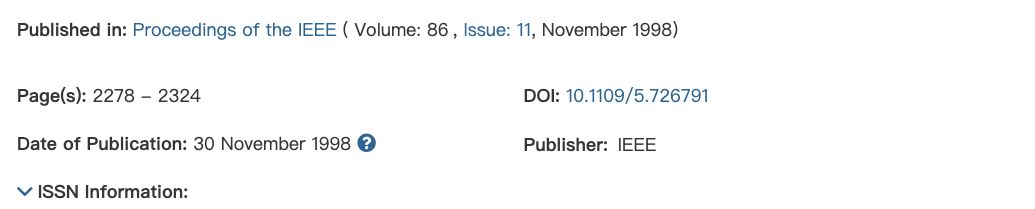
If your cited item has that discrepancy, change its Pages value to 2278-2324, allow the library change to sync, then refresh Word. Inspect the affected line to see whether the correction reached it. Changing citation style alone cannot establish the correct last page.
Compare your generated line with this editorial example, prepared from the checked fields using the IEEE Reference Guide periodical-with-DOI pattern. The example was composed for this guide.
[1] Y. Lecun, L. Bottou, Y. Bengio, and P. Haffner, “Gradient-based learning applied to document recognition,” Proc. IEEE, vol. 86, no. 11, pp. 2278-2324, Nov. 1998, doi: 10.1109/5.726791.
Preserve the full journal title in the source record and inspect the abbreviation in the output. The Cite v1.69.4 notes report expanded abbreviation coverage. Our IEEE journal abbreviations guide helps verify the required form.
A conference paper with its own title
The Computer Vision Foundation record identifies the four authors and pages 770-778. The Crossref record confirms the DOI and the 2016 IEEE Conference on Computer Vision and Pattern Recognition proceedings.
Keep the paper title separate from the proceedings title. An import saved as a generic webpage needs its type checked. For a downloaded preprint, compare its version with the proceedings paper. Our DOI to IEEE guide explains that identity check.
A book tied to the edition you used
The MIT Press record lists the 2016 hardcover of Deep Learning under ISBN 9780262035613. The eBook has ISBN 9780262337373. The authors' BibTeX entry confirms the authors, publisher, and 2016 year.
Compare the imported ISBN, publisher, and year with the copy you read. Leave the edition field empty when the book supplies no edition number. Mendeley accepts BibTeX library imports; our BibTeX to IEEE guide covers this site's separate import workflow, which has no connection to your Mendeley library.
Refresh and Inspect the Mendeley IEEE Bibliography
After inserting citations, place the cursor where the reference list belongs. Open More in Mendeley Cite and choose Insert Bibliography. Mendeley's bibliography guide explains that adding an earlier citation renumbers the managed entries and reorders the list.
After library corrections, choose More and Refresh References. The refresh guide says this updates citations and the bibliography from library changes, and can update the list after citations are deleted.
- Match each bracket number to its source. Citing the same record again should reuse its entry.
- Check the journal's corrected end page, the conference paper's proceedings context, and the book's year.
- Compare the journal abbreviation and punctuation with the receiving venue's instructions.
- In a test copy, insert an earlier citation and confirm that the linked numbers and list move together.
If a correction is missing, confirm that you edited the cited item and that its new value reached the cloud library. Check that the document still contains managed citations. Hand edits to bibliography text can be replaced by a later refresh. Repair the record or style, then inspect the generated line again.
Frequently Asked Questions
Why is IEEE missing from my Mendeley style list?
Use Search for another style inside Mendeley Cite. The initial list contains a limited selection. Check the full style name and apply it with Update citation style. An empty search or installation error needs an add-in or account check.
Can I fix a source's page range in the citation editor?
The citation editor's page attribute locates a passage you cite. The library item's Pages field describes the whole article. Mendeley's citation-editing help covers those local attributes. Repair the full source range in the library.
Can the IEEE Citation Generator update my Mendeley document?
The generator can prepare a separate reference from supported fields. Its output has no link to Mendeley Cite's managed citations. Keep a Cite-managed manuscript in that workflow and use a separate draft only for comparison.
Sources checked Oct. 5, 2026, in Chrome. IEEE's official guide resolved to V3.28.2025. Source metadata and the public catalogue discrepancy were verified; signed-in library edits, Word insertion, and Refresh References were not tested. Their instructions follow the linked Mendeley guides.