
A JabRef IEEE citation style lets you inspect a record in a familiar reference format while keeping the underlying bibliography reusable. Open a small .bib library, choose IEEE for the entry preview, then correct the source fields before passing the file to your manuscript. JabRef's entry-preview preference and the document's bibliography processor each have their own style setting.
Open a small library
Start with three records you can check independently. Our downloadable library contains Leslie Lamport's The Part-Time Parliament, Edsger Dijkstra's graph paper, and Attention is All you Need by Ashish Vaswani and colleagues. The first two are journal articles. The third is a conference contribution with a booktitle field. Keeping these types together gives you more to inspect than three nearly identical entries.
Download the teaching copy and the corrected library below. The teaching copy deliberately changes Lamport's volume from 16 to 61. This is an introduced error for the exercise, not a fault in a publisher export or a reported JabRef bug. Keep the corrected file as your comparison copy.
Download the teaching library · Download the corrected library
Use File → Open library and select ieee-library-before.bib. Confirm that the library contains three entries and that the citation keys are lamport1998, dijkstra1959, and vaswani2017. Double-click Lamport's row to open the entry editor. Keep the keys stable during this exercise so an existing manuscript can still find the same records.
JabRef edits .bib files directly. You do not need to export a separate proprietary database before another BibTeX application can read the library. Save a copy before experimenting with cleanup actions or changing library mode. A shared filename is easier to track than several different files all called references.bib.
Set the entry preview style
We checked the menus and IEEE preview in stable JabRef 5.15 on macOS using a temporary library populated from the three supplied records. The screenshot shows that preview check. JabRef also offers a 6.0 beta, whose controls can differ; these instructions describe 5.15.
Open File → Preferences → Entry preview on the macOS interface we checked. JabRef's documentation gives Options → Preferences → Entry preview. Look in Selected first. IEEE was already there in our check. If it is absent, find it under Available and add it, then save the settings. Return to the entry editor and press F9 to cycle to IEEE. A keyboard that reserves function keys for media controls may also need Fn.
If the preview is difficult to find, the same preferences area includes Show preview as a tab in entry editor. Enable that option if you prefer a named tab. JabRef's documentation says the regular preview is not displayed alongside the file-annotations or BibTeX source tab. Switch back to the ordinary entry fields when checking a change.
Look at the author initials, article title, journal, volume, issue, page range, and date. A JabRef IEEE preview helps reveal omissions quickly, but a finished-looking line can still contain false metadata. In our teaching copy, volume 61 can be neatly formatted and remain wrong.
Correct a record against the source
Lamport's author-hosted paper states that the article appeared in ACM Transactions on Computer Systems, volume 16, issue 2, May 1998, pages 133 through 169. Use that publication note to check the volume before changing it.
Select lamport1998 and open Optional fields. Change Volume from 61 to 16, then leave the field so the preview refreshes. Keep Number at 2 and Pages at 133--169. Ctrl+Tab also moves between editor tabs. The screenshot shows the corrected field beside the IEEE preview. Save your library and inspect its BibTeX source for the same change.
The table records the precise correction. Only the volume was deliberately corrupted. The citation key, author, journal, publication year, and DOI continue to identify the same article. Do not create a second entry simply to repair this field.
| Record and field | Teaching copy | Corrected library | Evidence |
|---|---|---|---|
lamport1998 volume | 61 | 16 | Publication note in the author-hosted paper |
| Issue and pages | 2 and 133--169 | 2 and 133--169 | Same journal publication note |
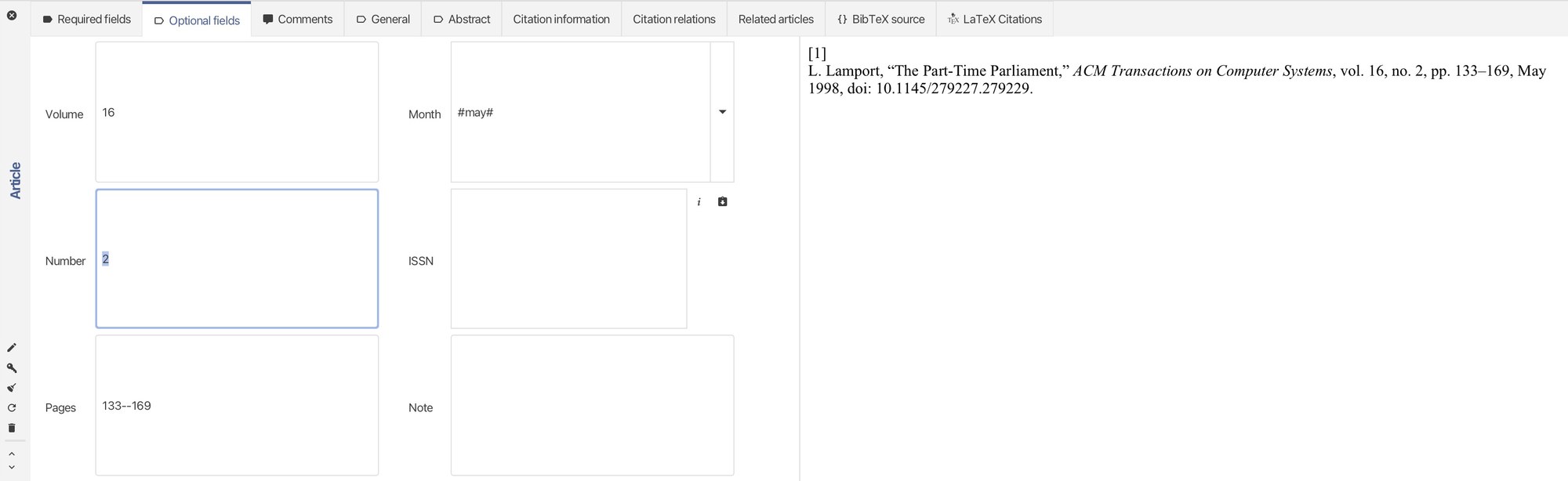
Check the other two records with the same care. Springer's page identifies Dijkstra's article as volume 1, pages 269 through 271, published in 1959. Preserve the original word connexion in the title. A spelling update would make the title less faithful to the publication.
For Attention is All you Need, the proceedings page provides eight authors, the 2017 proceedings, and a BibTeX download. We retain its conference type and booktitle. Its supplied pages field is empty, so this library leaves it empty rather than inventing a range. Follow the source link if your submission requires more complete proceedings details.
Save a reusable Bib file
Use File → Save library as to save your repaired library under ieee-library-corrected.bib. Close and reopen that copy, check the entry count, and verify Lamport's volume once more. This catches the simple mistake of repairing one file while uploading another. The downloadable corrected library supplies the three records without PDF attachments, local file paths, or account details.
Check citation keys after importing or pasting records. Our clipboard-based check generated new keys, which would need matching changes in an existing manuscript. The download files retain the lowercase keys listed above. Keep full author information in the database. JabRef's field documentation separates individual authors with and and permits the Last, First form. Let the chosen style shorten names or author lists in its output. Replacing stored authors with et al. removes information another journal may need later.
Separate the preview from the manuscript bibliography
A JabRef IEEE bibliography preview shows the selected record; its standalone [1] does not assign that source a number in your paper. Your manuscript also needs citation selection, numbering, and a document-level bibliography processor. Sorting the library table by author or year does not set first-citation order in the paper.
For a traditional IEEEtran BibTeX project, the manuscript selects its .bst with bibliographystyle and names the .bib file with bibliography. JabRef's preview preference does not write those commands into your .tex file. Keep the same citation keys when replacing the uploaded library, then rebuild the document and inspect its actual reference list.
Our Overleaf troubleshooting guide provides the manuscript-side commands and checks for unresolved keys and wrong order. If you need a separate static list from this site's generator, use the BibTeX guide for its supported fields and import limits. Continue editing the master library in JabRef so a formatting pass does not become your only surviving copy of the source data.