
To turn a Google Scholar result into an IEEE citation, open Cite, choose BibTeX, and check the record against the original publication before formatting. The Scholar menu we inspected had no IEEE style. We compared two ImageNet records on October 7, 2026 and found details worth checking before import, including a missing proceedings page range and different publication dates. The examples below show which fields belong to each record and how to pass a checked file to your IEEE workflow.
Identify the Exact Google Scholar Result
Search the paper title in quotation marks, then compare the result's authors, year, and publication with the work you read. Open the title link to find its source record. The PDF link may lead to another copy; the All versions link helps locate alternatives when the main link is inaccessible.
We searched for “ImageNet classification with deep convolutional neural networks” in Chrome on October 7, 2026. Scholar returned a 2012 proceedings paper and a 2017 journal article by Alex Krizhevsky, Ilya Sutskever, and Geoffrey E. Hinton. The matching title alone cannot tell you which publication to cite.
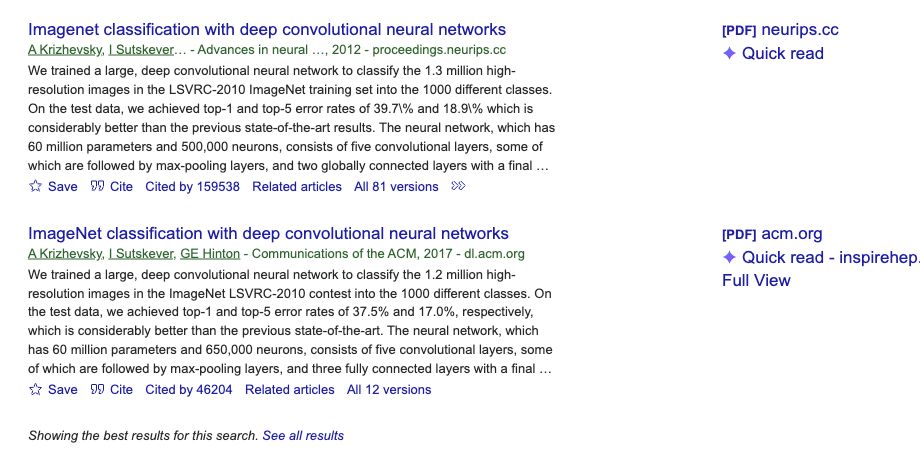
The NIPS 2012 proceedings page identifies the conference contribution. The ACM article page identifies the June 2017 journal publication. Cite the version you used and keep its year and pages together.
Export the Available Citation Data as BibTeX
Google's Scholar help describes the route through the result's Cite button and the export links at the bottom of its popup. In the English interface we checked, the displayed styles were MLA, APA, Chicago, Harvard, and Vancouver. IEEE was absent.
- Open Cite under the selected result.Confirm that the popup shows the intended authors and publication year.
- Choose BibTeX at the bottom.Preserve the complete record, including its entry type and closing brace. If it opens as text, save a plain-text copy with a .bib extension.
- Keep the original and check a working copy.Compare its fields with the publication record before importing it into an IEEE workflow.
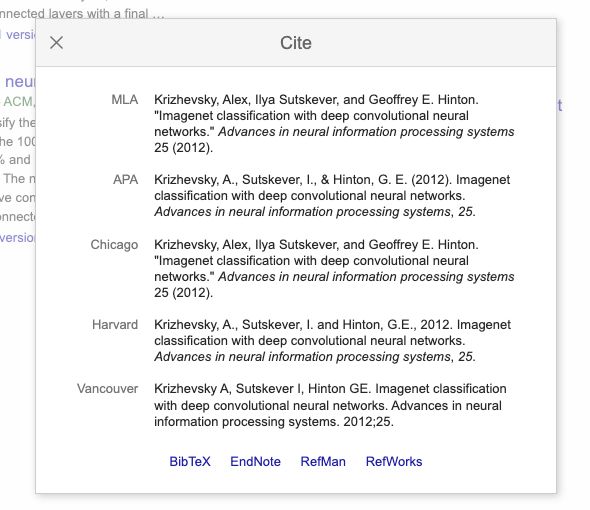
Chrome blocked Scholar's BibTeX endpoint with ERR_BLOCKED_BY_CLIENT during our test. We inspected both Cite dialogs and prepared the downloadable example from the original publication records. If your download fails, use the publisher's export or build a record from its verified fields. The comparisons below describe the visible Cite data; raw Scholar BibTeX was unavailable.
Compare Two Records With Their Original Sources
Start with the author order and title, then check the venue, dates, and pages. Verify the DOI or stable URL against that same publication. A formatter will carry mixed publication details into the finished reference.
The 2012 Proceedings Paper Needs Its Page Range
| Field | Scholar Cite dialog | Original proceedings record |
|---|---|---|
| Authors | Krizhevsky, Sutskever, Hinton | Same three authors in the same order |
| Publication | Advances in neural information processing systems, 25 | Advances in Neural Information Processing Systems 25, NIPS 2012 |
| Year | 2012 | 2012 |
| Pages | Not displayed | 1097-1105 in the Metadata file |
| Working entry type | Raw Scholar BibTeX unavailable in this test | @inproceedings in the proceedings site's export |
The proceedings site's own BibTeX file also contained pages = {}. Its Metadata file supplies page_first = 1097 and page_last = 1105. We filled the working copy with pages = {1097--1105}. Those are the proceedings pages; the downloaded PDF's local page counter runs from 1 to 9.
[1] A. Krizhevsky, I. Sutskever, and G. E. Hinton, “ImageNet classification with deep convolutional neural networks,” in Advances in Neural Information Processing Systems, vol. 25, 2012, pp. 1097-1105.
The 2017 Journal Record Has Different Publication Details
| Field | Scholar Cite dialog | ACM publication page |
|---|---|---|
| Authors | Krizhevsky, Sutskever, Hinton | Same three authors in the same order |
| Journal | Communications of the ACM | Communications of the ACM |
| Year, volume, issue | 2017, 60, 6 | June 2017 issue, volume 60, number 6 |
| Pages | 84-90 | 84-90 |
| DOI | Not displayed | 10.1145/3065386 |
The journal, year, volume, issue, and pages agreed. The ACM page's issue details supply the June date and DOI. Scholar's Vancouver line shows May 24, 2017; ACM's June issue is dated June 1. For this issue-assigned reference, we use Jun. 2017, following the IEEE guide's periodical instructions for volume and issue publication dates.
[2] A. Krizhevsky, I. Sutskever, and G. E. Hinton, “ImageNet classification with deep convolutional neural networks,” Commun. ACM, vol. 60, no. 6, pp. 84-90, Jun. 2017, doi: 10.1145/3065386.
These two checks establish specific omissions and a date distinction. They cannot tell us how often Scholar metadata is wrong. The reference examples follow IEEE's conference and periodical patterns; check your receiving publication's own instructions too.
Pass the Checked Record to Your IEEE Workflow
Download our checked two-record BibTeX file. Its conference entry includes the recovered pages. Preserve your original records separately.
For a standalone list, open this site's reference list and choose Import BibTeX. Our test imported one Conference entry and one Journal entry. Check their fields before copying. The Conference formatter omits the proceedings series volume, so add vol. 25 to the final text as shown above. The importer also drops original citation keys; our BibTeX to IEEE guide covers the other limits.
For an IEEEtran manuscript, keep the file in your bibliography database and cite its keys. Use the template's required style and inspect the compiled references. The generator's LaTeX export contains static text; the Overleaf bibliography guide covers a linked BibTeX workflow.
- Confirm that every reference identifies the publication you used.
- Keep all three authors in these examples and verify title capitalization.
- Check publication dates, pages, and DOI against the original record.
- Match each bracket number to the corresponding citation in your manuscript.
Questions After Export
Do I cite Google Scholar or the paper?
Cite the paper and its publication details when you use the paper's findings. Scholar is the search service that helped you locate it. A study about Scholar itself may cite the service as its subject.
What if the record has no DOI?
Check the publisher before treating it as missing. The 2012 proceedings record above can be identified through its venue, year, pages, and stable URL. Do not attach the 2017 article's DOI to it. For an identifier you already have, follow the DOI lookup and source-check guide.
Can I fix a Scholar result by editing my .bib file?
Your edits change the local file and references generated from it. They do not update Scholar's search result. Google's profile help also distinguishes editing a profile entry from correcting indexed search metadata.