
To convert PubMed to IEEE citations, export the selected records as an NBIB file, import them into a reference manager that supports MEDLINE/nbib, and choose the IEEE style. Review the imported fields before copying the list. We checked three real records and a local translator run on October 24, 2026. One imported article number needed a manual correction, and one paper had separate online and issue dates.
Select the PubMed Records You Intend to Cite
Start with the article's title and PMID. Check its authors and publication details before exporting. A search result can be the original paper, a correction, or another publication discussing it. Give each work you actually cite its own record.
Our sample contains three journal articles. The PhysioNet resource paper has a conventional page range. The MIMIC-III database paper has an article number. Jumper and colleagues' AlphaFold paper has separate online and issue dates. These differences make the records useful for checking an import.
You can retrieve this small set with the following PubMed query. It identifies the three records explicitly, so a broad topic search cannot quietly add unrelated results.
10851218[pmid] OR 27219127[pmid] OR 34265844[pmid]The sample uses PhysioNet, MIMIC-III, then AlphaFold as its teaching order. Your search results may appear in another order. Arrange the final reference list by the order in which you first cite the papers in your manuscript.
Export an NBIB File From PubMed
According to the PubMed User Guide, the batch-export route is Send to, followed by Citation manager. Check the articles you want, open that menu, confirm the selection, and choose Create file. Save the resulting .nbib file somewhere you can find again.
For a single article, the Cite popup also offers an NBIB download. Its ready-made citation choices are AMA, MLA, APA, and NLM. Choose an IEEE style later in your reference manager; copying an NLM citation and adding a bracketed number leaves the rest of its formatting unchanged.
Download the three-record NBIB sample. We retrieved the records through NCBI's EFetch service on October 24, 2026. This sample retains bibliographic fields and identifiers, while omitting abstracts and affiliations. It contains metadata for the papers, without their full text.
Open a copy in a text editor if the import fails. You should find three PMID- lines. Preserve continuation lines under long titles and keep the blank lines between records. Renaming an HTML download to .nbib will not produce a usable citation file.
Import the File and Compare the Fields
Zotero lists MEDLINE/nbib among its supported import formats. Its documented route is File, Import, then A file. Select your saved NBIB and inspect the resulting items. For this sample, expect three journal-article records. A successful import is the start of the field check.
We ran the public Zotero MEDLINE/nbib translator in a local Node adapter, then rendered the records with citeproc-js and the CSL IEEE style. The screenshot shows that free local import test's results. The desktop steps above follow Zotero's documentation; this test did not exercise its desktop interface or a word-processor plugin.
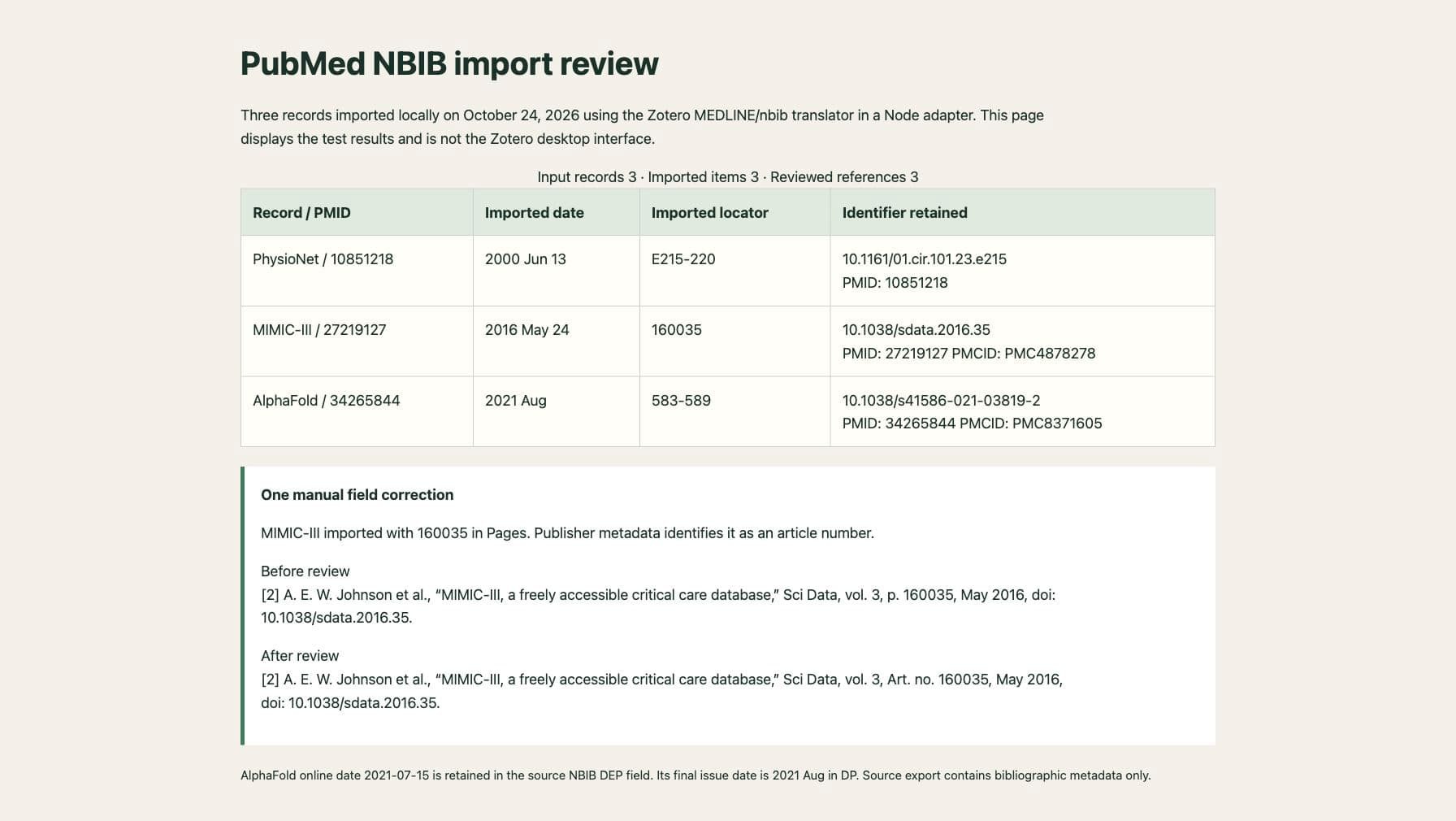
The imported PhysioNet page range expanded from E215-20 to E215-220. MIMIC-III's 160035 arrived in Pages. AlphaFold retained the August issue date and all 34 author records. Those are observed results for this file and translator snapshot, not guarantees for every reference manager.
Keep PMID, PMCID, and DOI Separate
A PMID identifies a PubMed record. A PMCID, including its PMC prefix, identifies an item in the PubMed Central full-text archive. A DOI identifies the publication registered with that DOI. Put the DOI in the DOI field and retain the other identifiers in their corresponding fields or research notes.
| Paper | PMID | PMCID | DOI |
|---|---|---|---|
| PhysioNet | 10851218 | Not present in this record | 10.1161/01.cir.101.23.e215 |
| MIMIC-III | 27219127 | PMC4878278 | 10.1038/sdata.2016.35 |
| AlphaFold | 34265844 | PMC8371605 | 10.1038/s41586-021-03819-2 |
NCBI's PMC ID Converter can connect the identifiers for articles in PMC. Keep its coverage in mind when checking a missing match. A publicly searchable PubMed citation does not establish that the paper's full text is freely available.
The NBIB uses PMID and PMC tags for those identifiers. In these records, AID includes a value marked [doi]. Read the marker along with the value. MIMIC-III has PMID 27219127 and article number 160035; swapping those two numbers would point the reference at the wrong record.
Check the Online Date Against the Final Issue
AlphaFold's NBIB record gives DP - 2021 Aug and DEP - 20210715. The first supplies the issue publication date; the second records electronic publication on July 15. The publisher's article record identifies volume 596, issue 7873, and pages 583-589. Its Crossref metadata records July 15 online and August 26 for print publication.
For the final issue reference shown below, retain August 2021 with that volume, issue, and page range. Keep July 15 in the source notes if you need to discuss the publication history. Database processing dates such as DCOM and LR do not replace the article's publication date.
Review the Imported IEEE Reference List
In Zotero, select the items, choose Create Bibliography from Item(s), select IEEE, and choose Bibliography as the output mode. The official bibliography instructions describe the available output methods. A copied bibliography is static text; its numbers need to match the citations in your manuscript.
Our local test exposed a locator error that a clean-looking reference can hide. MIMIC-III initially rendered p. 160035. The publisher record identifies 160035 as an article number. After moving it to the article-number value for the rendering step, the reference displayed Art. no. 160035.
Compare your output with the three reviewed teaching references. Check author order, the complete title, and the publication fields. The import retained NLM journal abbreviations. Use the journal abbreviation guide to check the form required by your destination.
For a few records, you can instead take each verified DOI to the IEEE journal citation generator. Review its returned fields and put MIMIC-III's 160035 in Article number, leaving Pages empty. This site accepts DOI lookups and BibTeX imports; it cannot directly import an NBIB file or resolve arbitrary PMIDs. If a lookup selects the wrong work, use the DOI field-check guide before copying the result.
Sources and Test Scope
The NLM and Zotero documentation, three NCBI records, and publisher-registered metadata were checked October 24, 2026. The local test imported three items and produced three references after the stated field correction. Its screenshot records the translator test results. It does not certify another library's metadata or a journal's complete submission requirements.